PlayOnLinux
-
<p style="text-align:center;"><span style="font-family:'lucida sans unicode', 'lucida grande', sans-serif;"><img alt="pol_banniere.png" src="https://www.playonlinux.com/images/pol_banniere.png"/></span></p>
<p> </p>
<p><span style="font-family:'lucida sans unicode', 'lucida grande', sans-serif;"><em>Sur Linux on ne peut pas jouer donc c'est nul... Faux !</em></span></p>
<p> </p>
<p><span style="font-family:'lucida sans unicode', 'lucida grande', sans-serif;"><strong>PlayOnLinux</strong> vous permet de <strong>jouer à vos jeux vidéo favoris</strong> même s'ils ne sont pas disponibles sous Linux.</span></p>
<p></p><p><span style="font-family:'lucida sans unicode', 'lucida grande', sans-serif;"><strong><span style="font-size:18px;">1. Mise à jour</span></strong></span></p>
<p> </p>
<p><span style="font-family:'lucida sans unicode', 'lucida grande', sans-serif;">Il est toujours bon d'etre à jour avant de se lancer dans une installation :</span></p>
<pre class="ipsCode prettyprint">
sudo apt-get update && sudo apt-get upgrade
</pre>
<p><span style="font-family:'lucida sans unicode', 'lucida grande', sans-serif;"><span style="font-size:18px;"><strong>2. Installation de Wine</strong></span></span></p>
<p> </p>
<p><em><span style="font-family:'lucida sans unicode', 'lucida grande', sans-serif;">Wine va nous servir à exécuter des logiciels Windows sur Linux, c'est une sorte de VirtualBox, et donc nous pourons jouer a nos jeux favoris.</span></em></p>
<p> </p>
<p><span style="font-family:'lucida sans unicode', 'lucida grande', sans-serif;">Exécutez la commande suivante :</span></p>
<pre class="ipsCode prettyprint">
sudo dpkg --print-architecture
</pre>
<p><span style="font-family:'lucida sans unicode', 'lucida grande', sans-serif;">Si vous avez un <span style="color:#b22222;"><strong>résultat différent de i386 </strong></span>exécutez la commande suivante :</span></p>
<pre class="ipsCode prettyprint">
sudo dpkg --add-architecture i386</pre>
<p>On ajoute le dépôt de Wine :</p>
<pre class="ipsCode prettyprint">
sudo add-apt-repository ppa:ubuntu-wine/ppa
</pre>
<p><span style="font-family:'lucida sans unicode', 'lucida grande', sans-serif;">Vous pouvez désormais installer Wine :</span></p>
<pre class="ipsCode prettyprint">
sudo apt-get update
sudo apt-get install wine
</pre>
<p><span style="font-family:'lucida sans unicode', 'lucida grande', sans-serif;"><span style="font-size:18px;"><strong>3. Installation de PlayOnLinux</strong></span></span></p>
<p> </p>
<p><span style="font-family:'lucida sans unicode', 'lucida grande', sans-serif;"><em>PlayOnLinux va nous servir pour installer et exécuter facilement nos jeux sur Linux.</em></span></p>
<p> </p>
<p><span style="font-family:'lucida sans unicode', 'lucida grande', sans-serif;">Site officiel : <span style="font-size:14px;"><a data-ipb="nomediaparse" href="http://www.playonlinux.com/fr" rel="external nofollow">http://www.playonlinux.com/fr</a></span></span></p>
<p> </p>
<p><span style="font-family:'lucida sans unicode', 'lucida grande', sans-serif;">Rien de plus simple, il vous suffit d'exécuter la commande suivante :</span></p>
<pre class="ipsCode prettyprint">
sudo apt-get install playonlinux</pre>
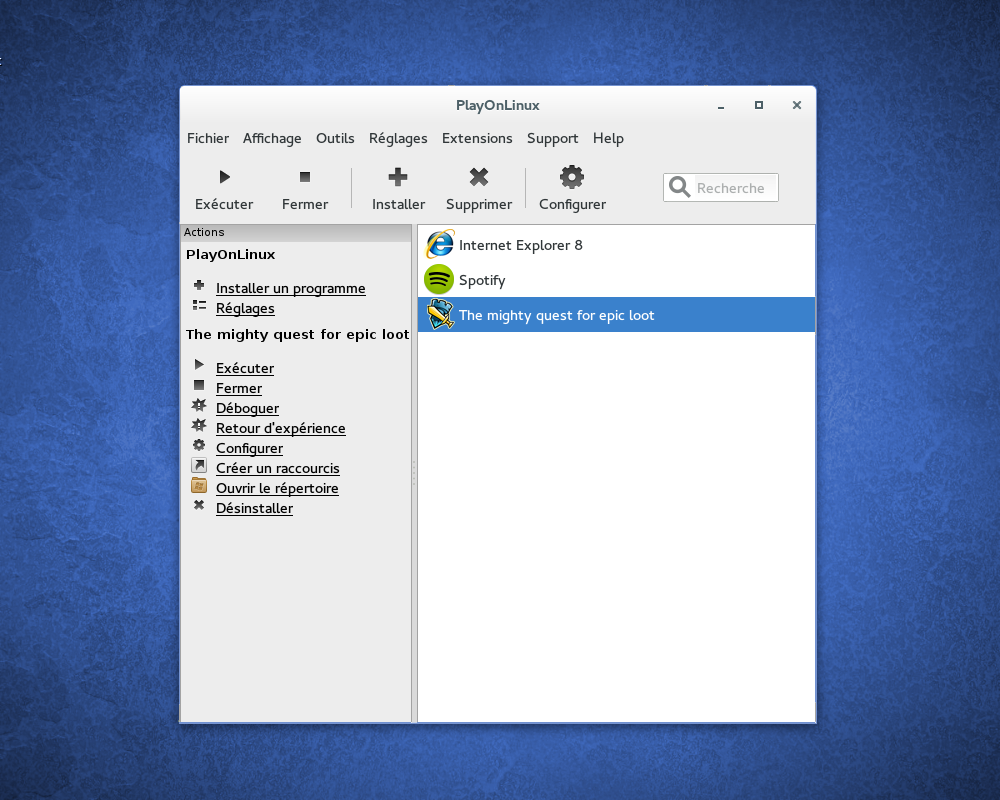
<p><span style="font-family:'lucida sans unicode', 'lucida grande', sans-serif;">En tapant la commande <strong>playonlinux</strong> vous devrez avoir la fenêtre ci-dessous :</span></p>
<p><img alt="install_wizard.png" src="https://www.playonlinux.com/images/playonlinux_screenshots/install_wizard.png"/></p>
<p> </p>
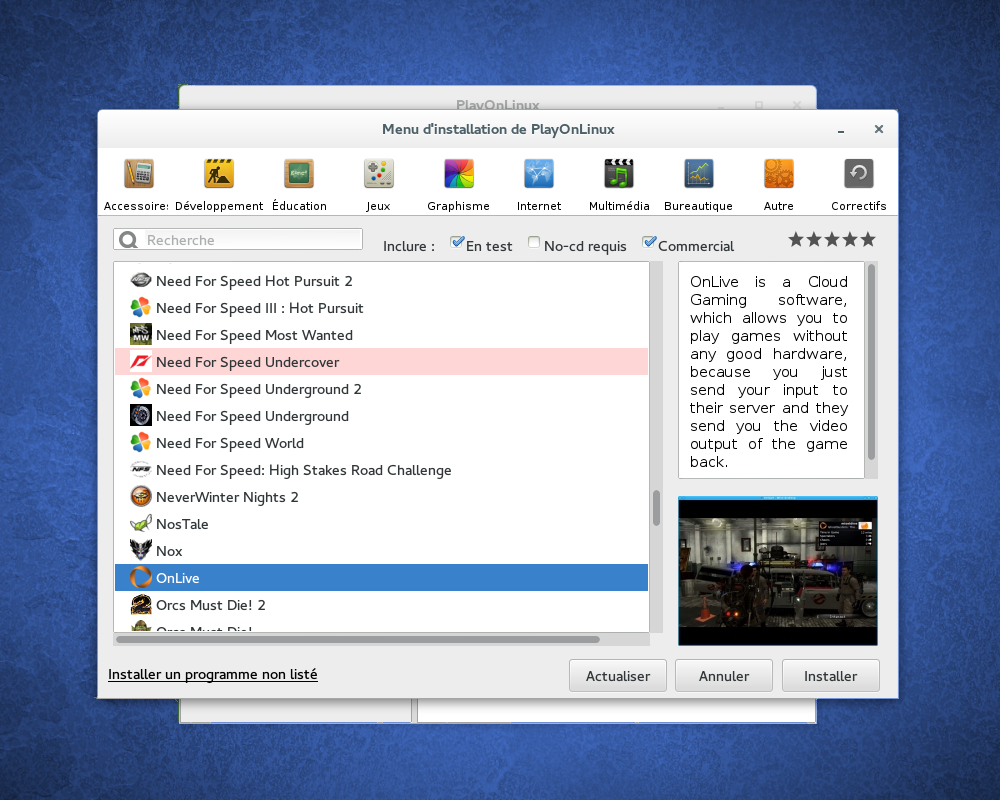
<p><span style="font-family:'lucida sans unicode', 'lucida grande', sans-serif;">Cliquez sur installer pour installer un programme :</span></p>
<p><img alt="program.png" src="https://www.playonlinux.com/images/playonlinux_screenshots/program.png"/></p>
<p> </p>
<p>Vous pourrez trouver plus d'informations sur le téléchargement de PlayOnLinux ici : <a data-ipb="nomediaparse" href="http://www.playonlinux.com/fr/download.html" rel="external nofollow">http://www.playonlinux.com/fr/download.html</a></p> -
<p>excellent partage !</p>
<p>+1 rep</p> -
<p>J'ai joué a lol hier et ça fonctionnait parfaitement cependant j'ai pu remarquer une très grosse différence d'IPS (sous win je tourne a 60 IPS en qualité optimale alors que sous mint je tourne a 30 IPS en qualité moyenne) mais cela est peut etre du un problème avec mon pilote graphique. Il faut noter aussi que ce jeu est en beta.</p>
-
<blockquote class="ipsQuote" data-cite="Soulalex" data-ipsquote="" data-ipsquote-contentclass="forums_Topic" data-ipsquote-contentcommentid="11632" data-ipsquote-contentid="1094" data-ipsquote-contenttype="forums" data-ipsquote-timestamp="1411105641" data-ipsquote-username="Soulalex"><div>
<div>
<p>J'ai joué a lol hier et ça fonctionnait parfaitement cependant j'ai pu remarquer une très grosse différence d'IPS (sous win je tourne a 60 IPS en qualité optimale alors que sous mint je tourne a 30 IPS en qualité moyenne) mais cela est peut etre du un problème avec mon pilote graphique. Il faut noter aussi que ce jeu est en beta.</p>
</div>
</div></blockquote>
<p>Tiens, tu as finit par devenir ami avec linux? :')</p>
<p>effectivement, ca doit etre un problème de pilote. De mon coté: Windows 62~65ips, linux: 70~73 ips.</p>



 </p>
</p>

 )</p>
)</p>


Hello! It looks like you're interested in this conversation, but you don't have an account yet.
Getting fed up of having to scroll through the same posts each visit? When you register for an account, you'll always come back to exactly where you were before, and choose to be notified of new replies (either via email, or push notification). You'll also be able to save bookmarks and upvote posts to show your appreciation to other community members.
With your input, this post could be even better 💗
Register Login