[Map] The Manor [1.7.2]
-
<p><strong>Coucou,</strong></p>
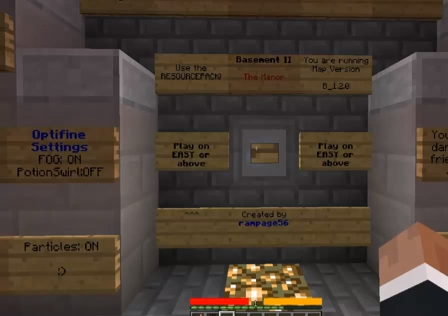
<p></p><p><strong>The Manor</strong> est une map en <strong>1.7.2 </strong>créée par <strong>Rampage56 </strong>dans laquelle vous et vos amis avez décidé de passer la nuit dans le manoir <strong>East Underhold</strong> supposé être un site hanté. Mais voilà maintenant près de 20 ans qu’il n’y a pas eu de nouvelles de ce fameux manoir et tout ce que l’on sait, c’est que sont inscrits sur les murs de celui-ci, les noms de 41 personnes assassinées.</p>
<p>Vous l’aurez compris cette map est, comme la dernière que nous avons pu vous présenter, de type horreur. Vous y retrouvez donc des jumpscares, des bruits stridents ainsi que des scènes ou images gores. Dès le début, vous serez dans le noir et ne saurez trop quoi faire. Gardez à l’esprit de toujours faire attention à où vous vous dirigez et à bien lire les différents messages.</p>
<p> </p>
<p><strong>Règles :</strong></p>
<ul><li>Ne placer/poser aucun bloc, sauf les clés</li>
<li>Utiliser le resource pack</li>
<li>Réglez les particules au minimum et activez le brouillard</li>
</ul><p><strong>Trailer </strong></p>
<p> </p>
<p><a href="http://www.dailymotion.com/video/x1flpj3_basement-2-the-manor_videogames?start=31" rel="external nofollow">http://www.dailymotion.com/video/x1flpj3_basement-2-the-manor_videogames?start=31</a></p>
<p> </p>
<p><img alt="ss-2014-03-09-at-12.38.44.png" src="http://minecraft.fr/wp-content/uploads/2014/03/ss-2014-03-09-at-12.38.44.png"/></p>
<p> </p>
<p><img alt="ss-2014-03-09-at-12.41.27.png" src="http://minecraft.fr/wp-content/uploads/2014/03/ss-2014-03-09-at-12.41.27.png"/></p>
<p> </p>
<p><strong>Installation</strong></p>
<p> </p>
<p><span style="color:#99cc00;"><strong>1.</strong></span> Téléchargez la map.</p>
<p><span style="color:#99cc00;"><strong>2.</strong></span> Avec votre logiciel d’extraction (WinRAR, 7Zip, etc.) ouvrez l’archive de la map.</p>
<p><span style="color:#99cc00;"><strong>3.</strong></span> Localisez le dossier .minecraft. L’emplacement varie selon le système d’exploitation :</p>
<p><img alt="Windows.png" height="16" src="http://minecraft.fr/wp-content/uploads/2012/01/Windows.png" title="The Manor" width="16"/><em><strong>Windows</strong></em> : Appuyez simultanément sur les touches <img alt="symbol-7.png" height="32" src="http://minecraft.fr/wp-content/uploads/2012/01/symbol-7.png" title="The Manor" width="32"/> + <img alt="r.png" height="32" src="http://minecraft.fr/wp-content/uploads/2012/01/r.png" title="The Manor" width="32"/> et tapez %appdata%.</p>
<p><img alt="Mac.png" height="16" src="http://minecraft.fr/wp-content/uploads/2012/01/Mac.png" title="The Manor" width="16"/><em><strong>Mac OS</strong></em> : Le dossier minecraft se situe dans :</p>
<p>Utilisateur > Bibliothèque > Application Support.</p>
<p><img alt="Linux.png" height="16" src="http://minecraft.fr/wp-content/uploads/2012/01/Linux.png" title="The Manor" width="16"/><em><strong>Linux</strong></em> : Appuyez simultanément sur les touches <img alt="alt.png" height="32" src="http://minecraft.fr/wp-content/uploads/2012/01/alt.png" title="The Manor" width="32"/> + <img alt="f2.png" height="32" src="http://minecraft.fr/wp-content/uploads/2012/01/f2.png" title="The Manor" width="32"/> et tapez .minecraft. Validez et vous serez directement amené au dossier (GNOME uniquement, CTRL+H dans le dossier personnel pour les autres environnements graphiques).</p>
<p><span style="color:#99cc00;"><strong>4.</strong></span> Ouvrez le répertoire saves et extrayez le dossier de l’archive de la map dans ce dossier.</p>
<p><span style="color:#99cc00;"><strong>5.</strong></span> Fermez le dossier et lancez Minecraft. Votre partie est affichée dans le menu Singleplayer.</p>
<p> </p>
<p><strong>Téléchargement </strong>: <a href="http://www.mediafire.com/download/228lb7cs5dg2w7u/The_Manor_R110.zip" rel="external nofollow">http://www.mediafire.com/download/228lb7cs5dg2w7u/The_Manor_R110.zip</a></p>
<p><strong>VirusTotal </strong>: <a href="https://www.virustotal.com/fr/file/3b963e402d409fcabec8a2b92c95661119be506f3d84ea5939a246e51f15af81/analysis/1394549894/" rel="external nofollow">https://www.virustotal.com/fr/file/3b963e402d409fcabec8a2b92c95661119be506f3d84ea5939a246e51f15af81/analysis/1394549894/</a></p>
<p><strong><span style="font-size:8px;"><span style="color:rgb(105,105,105);">Source : mc.fr</span></span></strong></p>
<p> </p>
<p><strong>Cordialement, Soon.</strong></p>

 <br/>
<br/> </p>
</p>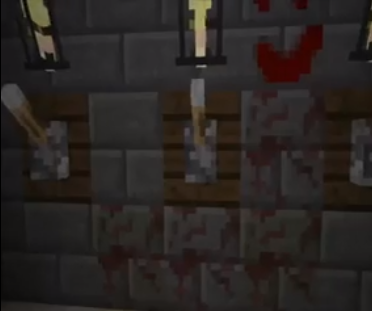


Hello! It looks like you're interested in this conversation, but you don't have an account yet.
Getting fed up of having to scroll through the same posts each visit? When you register for an account, you'll always come back to exactly where you were before, and choose to be notified of new replies (either via email, or push notification). You'll also be able to save bookmarks and upvote posts to show your appreciation to other community members.
With your input, this post could be even better 💗
Register Login