[Firefox] Télécharger une vidéo YouTube
-
<p><strong>Coucou,</strong></p>
<p> </p>
<p>De nombreux services et extensions existent pour télécharger une vidéo YouTube en vidéo au format MP4 sur son ordinateur. L'extension Download YouTube Videos as MP4 pour Firefox est simple et efficace.</p>
<ol><li>Dans Firefox, rendez-vous sur <a href="https://addons.mozilla.org/fr/firefox/addon/download-youtube/" rel="external nofollow">la fiche de L'extension Download YouTube Videos as MP4</a>.<br/><br/><img alt="3993-1.png" src="<base_url>/applications/sslimageproxy/interface/image.php?url=http://images.pcastuces.com/adj/3993-1.png"/></li><li>Cliquez sur le bouton <b>Ajouter à Firefox</b>.<br/><br/><img alt="3993-2.png" src="<base_url>/applications/sslimageproxy/interface/image.php?url=http://images.pcastuces.com/adj/3993-2.png"/></li>
<li>Cliquez ensuite sur le bouton <b>Installer maintenant</b>.<br/><br/><img alt="3993-3.png" src="<base_url>/applications/sslimageproxy/interface/image.php?url=http://images.pcastuces.com/adj/3993-3.png"/></li>
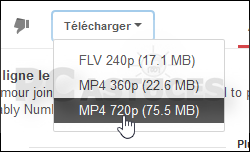
<li>L'extension est maintenant installée. Désormais, lorsque vous visionnez une vidéo YouTube, un nouveau bouton <b>Télécharger</b> est présent sous la vidéo. Cliquez dessus.<br/><br/><img alt="3993-4.png" src="<base_url>/applications/sslimageproxy/interface/image.php?url=http://images.pcastuces.com/adj/3993-4.png"/></li>
<li>Choisissez le format de la vidéo que vous souhaitez télécharger, MP4 par exemple.<br/><br/><img alt="3993-5.png" src="<base_url>/applications/sslimageproxy/interface/image.php?url=http://images.pcastuces.com/adj/3993-5.png"/></li>
<li>Sélectionnez l'option <b>Enregistrer le fichier</b> et cliquez sur <b>OK</b>.<br/><br/><img alt="3993-6.png" src="<base_url>/applications/sslimageproxy/interface/image.php?url=http://images.pcastuces.com/adj/3993-6.png"/></li>
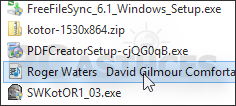
<li>La vidéo est téléchargée sur votre ordinateur. Vous pouvez la regarder quand vous le souhaitez.<br/><br/><img alt="3993-7.png" src="<base_url>/applications/sslimageproxy/interface/image.php?url=http://images.pcastuces.com/adj/3993-7.png"/></li>
</ol><p> </p>
<p><u>Notes </u>: Simple clic et rapide !</p>
<p> </p>
<p><strong><span style="font-size:8px;"><span style="color:rgb(105,105,105);">Source : PC Astuces</span></span></strong></p>
<p> </p>
<p><strong>Cordialement, Soon</strong></p> -
<p>Merci
 Mais perso, je prends ça moi : <a href="http://www.clipconverter.cc/fr/" rel="external nofollow">http://www.clipconverter.cc/fr/</a> ^_^ </p>
 -
<blockquote class="ipsQuote" data-cite="Soulalex" data-ipsquote="" data-ipsquote-contentclass="forums_Topic" data-ipsquote-contentcommentid="2395" data-ipsquote-contentid="207" data-ipsquote-contenttype="forums" data-ipsquote-timestamp="1395156325" data-ipsquote-username="Soulalex"><div>
<div>
<p>Merci du partage très utile Peut convertir la vidéo en MP3 ?</p>
</div>
</div></blockquote> -
<p>Merci pour l'astuce !</p>








Hello! It looks like you're interested in this conversation, but you don't have an account yet.
Getting fed up of having to scroll through the same posts each visit? When you register for an account, you'll always come back to exactly where you were before, and choose to be notified of new replies (either via email, or push notification). You'll also be able to save bookmarks and upvote posts to show your appreciation to other community members.
With your input, this post could be even better 💗
Register Login