Trouver une musique avec Midomi
-
<p><strong>Coucou,</strong></p>
<p> </p>
<p>Vous avez un morceau d'une musique dans la tête mais vous ne savez pas c'est laquelle? Alors Midomi est fait pour vous !</p>
<p> </p>
<p>Midomi est un site sur lequel vous pouvez chanter, mettre de la musique pour trouver celle que vous chercher.</p>
<p> </p>
<p><strong>Passons au tutoriel !</strong></p>
<p> </p>
<p>Tout d'abord, rendez vous sur le site <a href="http://www.midomi.com/" rel="external nofollow">http://www.midomi.com/</a> <strike>et téléchargez les dernières nouveautés</strike><u>.</u></p>
<p> </p>
<p><img alt="tuto-446d57f.png" src="<base_url>/applications/sslimageproxy/interface/image.php?url=http://img101.xooimage.com/files/c/b/4/tuto-446d57f.png"/></p>
<p> </p>
<p>Arrivez là, vous allez cliquer sur le bouton " Click and sing or Hum " c'est à dire " cliquer et chanter ou fredonner".</p>
<p> </p>
<p><img alt="tuto1-446d58d.png" src="<base_url>/applications/sslimageproxy/interface/image.php?url=http://img102.xooimage.com/files/b/2/9/tuto1-446d58d.png"/></p>
<p> </p>
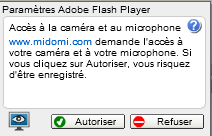
<p>A ce moment-là, il faudra autoriser le site à avoir accès à votre microphone.</p>
<p> </p>
<p><img alt="tuto2-446d594.png" src="<base_url>/applications/sslimageproxy/interface/image.php?url=http://img105.xooimage.com/files/c/7/3/tuto2-446d594.png"/></p>
<p> </p>
<p>Donc vous cliquez sur <strong>Autoriser</strong> <strike>comme un con</strike>.</p>
<p> </p>
<p><img alt="pBbvsps.png" src="https://i.imgur.com/pBbvsps.png"/></p>
<p> </p>
<p><em>Ca charge, ça charge ... </em></p>
<p> </p>
<p><img alt="0c74502739644611bdbb982.png" src="http://img339.imageshack.us/img339/7065/0c74502739644611bdbb982.png"/></p>
<p> </p>
<p>Et maintenant, à vous de jouer ! Mettez la musique que vous voulez trouver ( on va prendre Billie Jean de Michael Jackson ici ) où chanter :lol: et attendez sagement. Pour des performances optimales, laisser passer la musique jusqu'à que la page se charge seule.</p>
<p> </p>
<p><img alt="Hh4G9Zb.png" src="https://i.imgur.com/Hh4G9Zb.png"/></p>
<p> </p>
<p><img alt="tuto3-446d5bf.png" src="<base_url>/applications/sslimageproxy/interface/image.php?url=http://img109.xooimage.com/files/f/f/3/tuto3-446d5bf.png"/></p>
<p> </p>
<p><strong>Et voilà ! Mouahaha easy !</strong></p>
<p> </p>
<p><u><span style="font-size:12px;"><strong>Crédits </strong>: Californian pour certaines images.</span></u></p>
<p> </p>
<p><strong>Cordialement, Soon.</strong></p>
<p></p>



 </p>
</p>
 </p>
</p>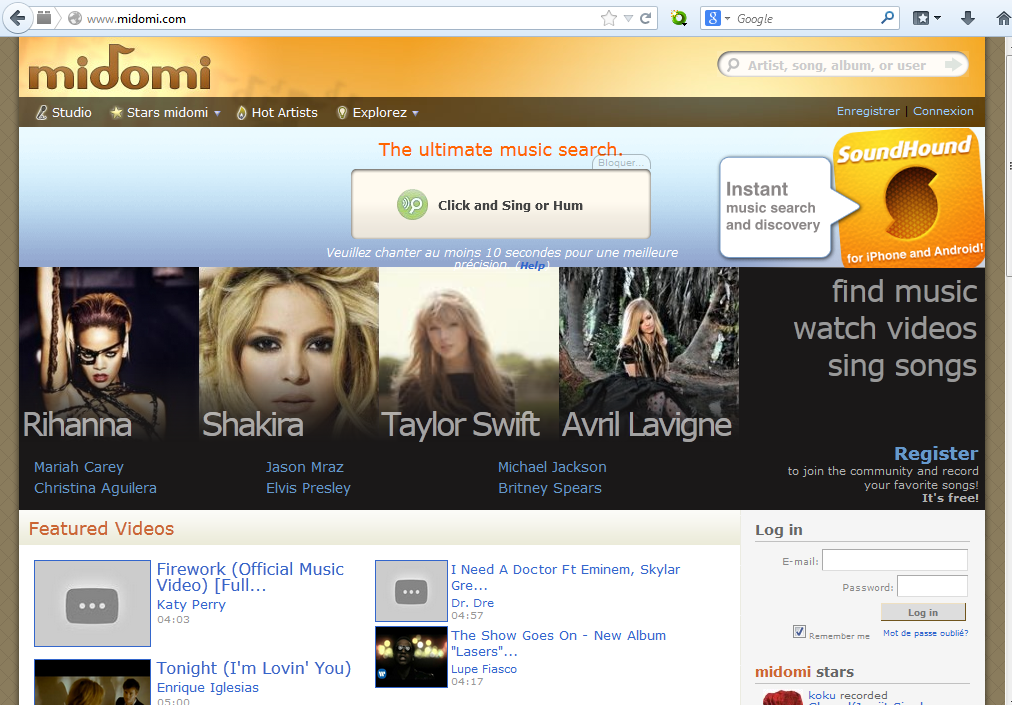



Hello! It looks like you're interested in this conversation, but you don't have an account yet.
Getting fed up of having to scroll through the same posts each visit? When you register for an account, you'll always come back to exactly where you were before, and choose to be notified of new replies (either via email, or push notification). You'll also be able to save bookmarks and upvote posts to show your appreciation to other community members.
With your input, this post could be even better 💗
Register Login