Sauvegarder le registre
-
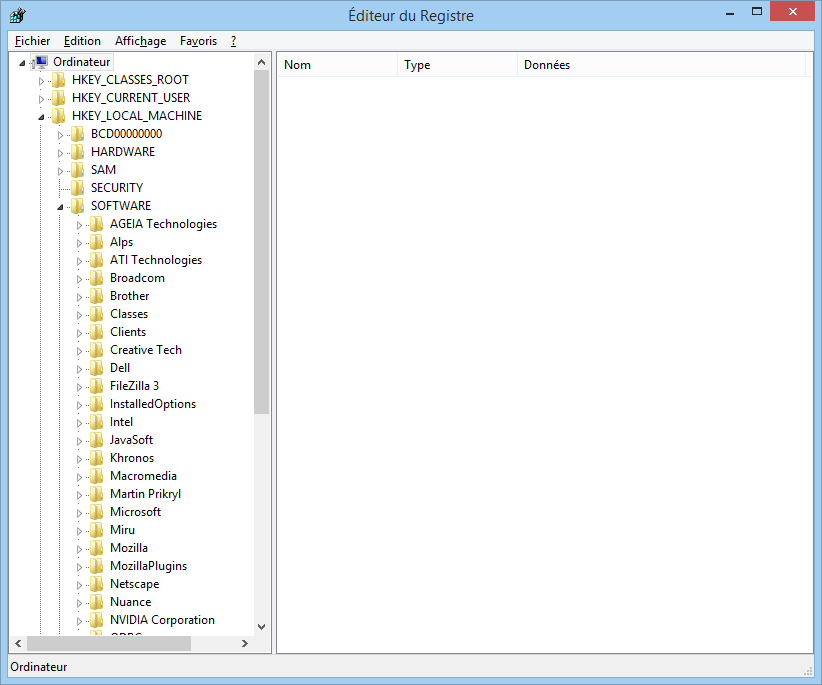
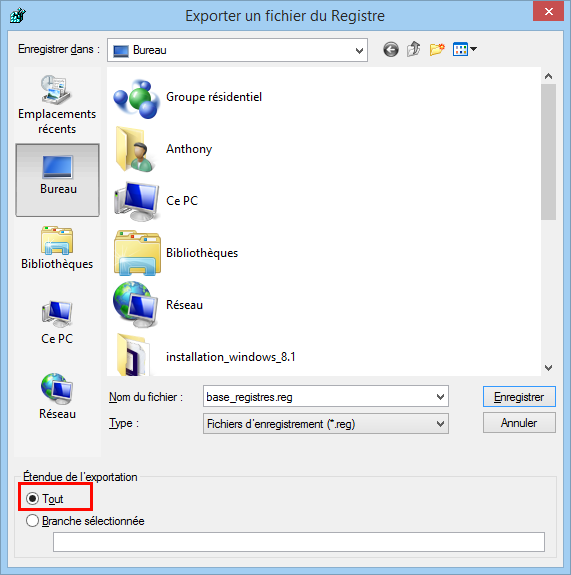
<p style="text-align:center;"><a class="attach-link" href="/assets/uploads/ips/monthly_03_2014/post-5-0-87034200-1395233658.png"><img alt="post-5-0-87034200-1395233658_thumb.png" src="/assets/uploads/ips/monthly_03_2014/post-5-0-87034200-1395233658_thumb.png" width="100"/></a></p> <br/>La base de registres est vitale au bon fonctionnement du système, et une sauvegarde de celle ci peut vous éviter bien des soucis.<br/>Il existe plusieurs méthodes, avec les dernières versions de Windows (Windows 8, Windows 7, Windows XP), vous n'avez plus besoin de quitter l'interface graphique.<br/>Avec l'interface graphique de Windows 8<br/>La procédure est la même pour Windows 7 et Windows XP. Cliquez sur le bouton Windows, puis sur Exécuter, ou tapez sur les touches <strong><img alt="touche_windows.png" src="<base_url>/applications/sslimageproxy/interface/image.php?url=http://www.vulgarisation-informatique.com/images/touche_windows.png"/> + R</strong>, puis tapez <strong>regedit</strong>. L'éditeur du registre s'ouvre :<br/><p style="text-align:center;"><img alt="etape1.png" src="<base_url>/applications/sslimageproxy/interface/image.php?url=http://www.vulgarisation-informatique.com/images/articles/sauvegarde-registre/etape1.png"/></p> <br/><p style="text-align:center;"><em>Éditeur du registre</em></p> <br/>Cliquez sur <strong>Fichier => Exporter</strong>.<br/>Sélectionnez l'option <strong>Tout</strong> pour exporter l'ensemble du registre. Donnez un nom à votre fichier puis cliquez sur <strong>Enregistrer</strong>.<br/><p style="text-align:center;"><img alt="etape2.png" src="<base_url>/applications/sslimageproxy/interface/image.php?url=http://www.vulgarisation-informatique.com/images/articles/sauvegarde-registre/etape2.png"/></p> <br/><p style="text-align:center;">Sauvegarde du registre</p><p style="text-align:center;"><br/></p> <br/><span style="color:#808080;">Tutoriel trouvé sur </span><a data-ipb="nomediaparse" href="http://www.vulgarisation-informatique.com/sauvegarder-base-registres.php" rel="external nofollow"><span style="color:#808080;">vulgarisation-informatique.com</span></a>


 </p>
</p>
 </p>
</p>
Hello! It looks like you're interested in this conversation, but you don't have an account yet.
Getting fed up of having to scroll through the same posts each visit? When you register for an account, you'll always come back to exactly where you were before, and choose to be notified of new replies (either via email, or push notification). You'll also be able to save bookmarks and upvote posts to show your appreciation to other community members.
With your input, this post could be even better 💗
Register Login