Google Authenticator
-
<p style="text-align:center;"><img alt="Google-Authenticator-icon.png" src="https://icons.iconarchive.com/icons/marcus-roberto/google-play/128/Google-Authenticator-icon.png"/></p>
<p> </p>
<p><span style="font-family:'lucida sans unicode', 'lucida grande', sans-serif;">Dans un soucis de sécurité permanent, <strong>Google Authenticator</strong> est une application mobile gérant les clés de sécurité pour une <strong>authentification en deux étapes</strong> renforçant ainsi la <strong>sécurité de vos comptes</strong> avec en plus de votre mot de passe, un <strong>code généré aléatoirement toutes les 30 secondes</strong> par cette application.</span></p>
<p></p><p><span style="font-family:'lucida sans unicode', 'lucida grande', sans-serif;"><strong>La prise en main de cette application est relativement simple :</strong></span></p>
<p> </p>
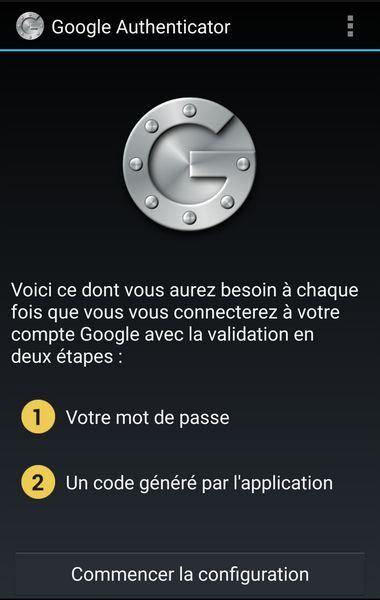
<p style="text-align:center;"><span style="color:#0000ff;"><span style="font-family:'lucida sans unicode', 'lucida grande', sans-serif;"><span style="font-size:18px;">Premier écran de démarrage. L'icône en haut à droite permet d'ajouter d'autres comptes.</span></span></span></p>
<p style="text-align:center;"><span style="font-family:'lucida sans unicode', 'lucida grande', sans-serif;"><img alt="google-authenticator-6.jpg" src="<base_url>/applications/sslimageproxy/interface/image.php?url=http://www.it-connect.fr/wp-content-itc/uploads/2015/04/google-authenticator-6.jpg"/></span></p>
<p> </p>
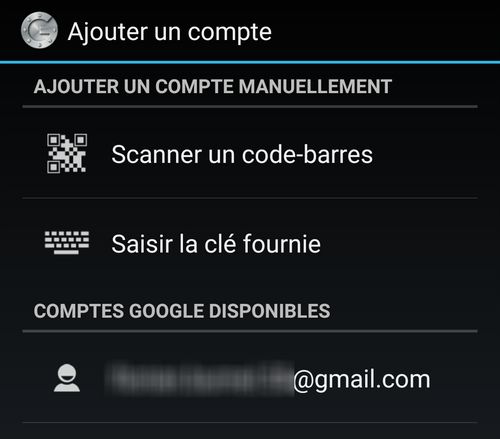
<p style="text-align:center;"><span style="color:#0000ff;"><span style="font-size:18px;"><span style="font-family:'lucida sans unicode', 'lucida grande', sans-serif;">Vous avez la possibilité de scanner un code barre ou de saisir une clé fournie par votre site.</span></span></span></p>
<p style="text-align:center;"><span style="font-family:'lucida sans unicode', 'lucida grande', sans-serif;"><img alt="google-authenticator-7.jpg" src="<base_url>/applications/sslimageproxy/interface/image.php?url=http://www.it-connect.fr/wp-content-itc/uploads/2015/04/google-authenticator-7.jpg"/> </span></p>
<p> </p>
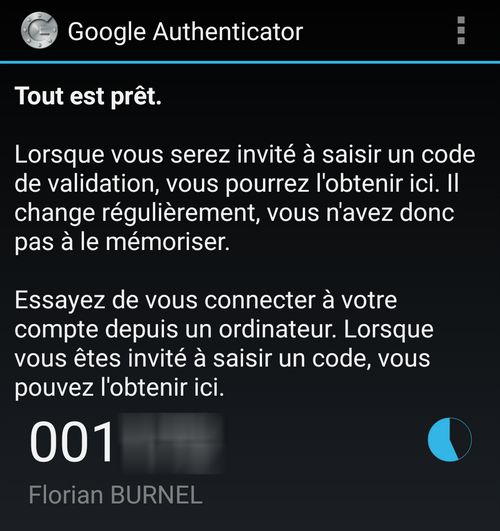
<p style="text-align:center;"><span style="color:#0000ff;"><span style="font-size:18px;"><span style="font-family:'lucida sans unicode', 'lucida grande', sans-serif;">Vos codes générés apparaissent avec une durée de vie de 30 secondes.</span></span></span></p>
<p style="text-align:center;"><span style="font-family:'lucida sans unicode', 'lucida grande', sans-serif;"><img alt="google-authenticator-9.jpg" src="<base_url>/applications/sslimageproxy/interface/image.php?url=http://www.it-connect.fr/wp-content-itc/uploads/2015/04/google-authenticator-9.jpg"/></span></p>
<p style="text-align:center;"> </p>
<p style="text-align:center;"> </p>


Hello! It looks like you're interested in this conversation, but you don't have an account yet.
Getting fed up of having to scroll through the same posts each visit? When you register for an account, you'll always come back to exactly where you were before, and choose to be notified of new replies (either via email, or push notification). You'll also be able to save bookmarks and upvote posts to show your appreciation to other community members.
With your input, this post could be even better 💗
Register Login